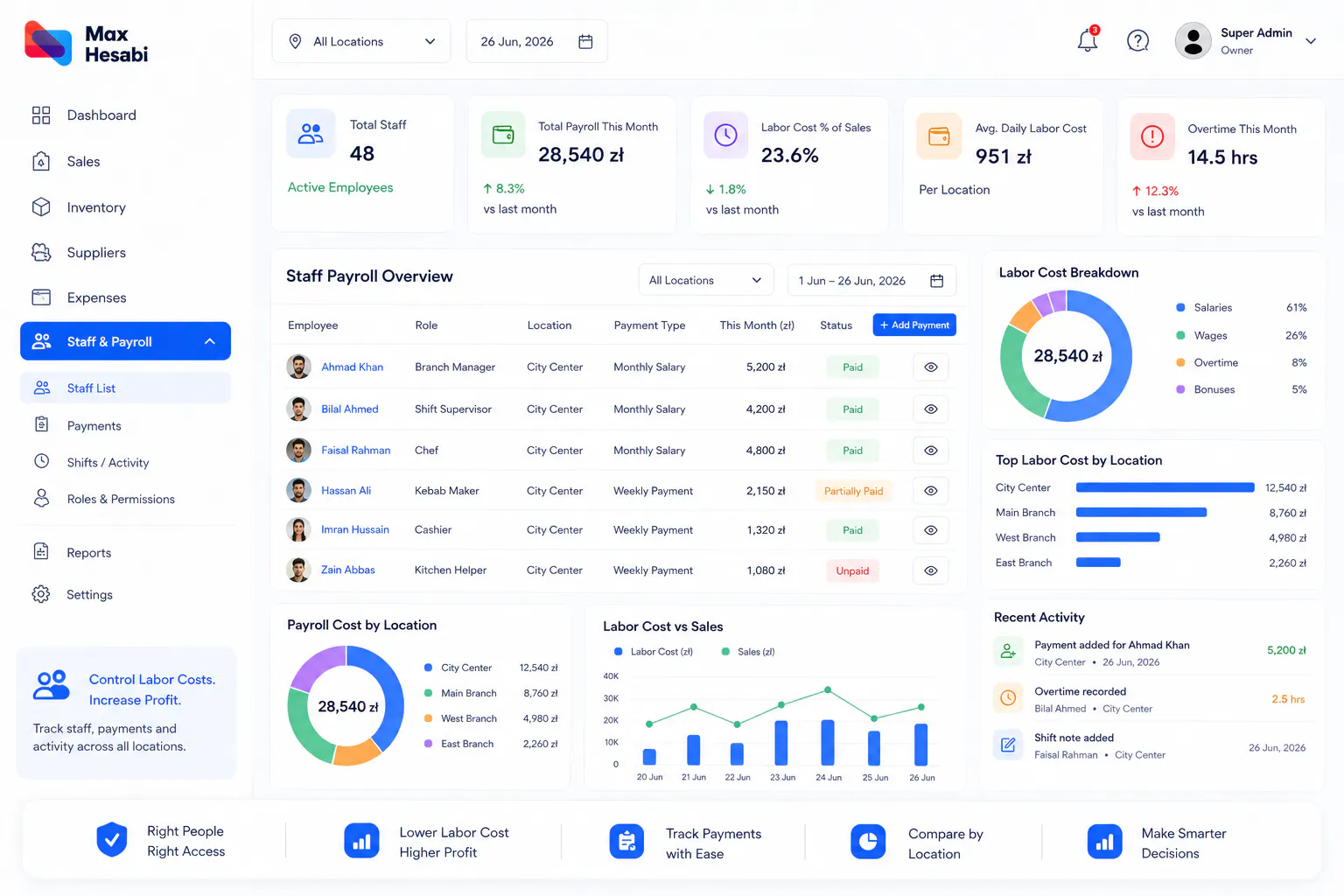
How to Manage Staff and Payroll in Max Hesabi
Learn how to organize staff records, track employee payments, manage branch manager activity, review payroll costs, and connect labor expenses with restaurant performance in Max Hesabi.
Connect Staff Costs with Daily Operations
Staff and payroll costs affect restaurant profit every day. If employee payments, manager updates, and labor costs are tracked separately from sales and expenses, owners cannot see the real performance of each location.
Max Hesabi helps restaurants, kebab shops, cafes, and food businesses organize staff-related activity and connect labor costs with reporting, expenses, and location performance.
Step 1: Decide Which Staff Records You Need
Start by deciding what staff information your business needs to track. Keep the setup practical so managers can use it consistently.
Useful staff records may include:
- Employee name
- Role or position
- Assigned location
- Payment type or payment notes
- Manager responsibility
- Access level inside Max Hesabi
The goal is to keep staff records clear enough for payroll and reporting without creating unnecessary admin work.
Step 2: Assign Staff to the Correct Location
Each employee or manager should be connected to the location where they work. This is especially important for multi-location businesses because labor costs should be reviewed by branch.
Correct location assignment helps owners understand which restaurant, kebab shop, cafe, or food business branch is responsible for each staff cost.
Step 3: Set the Right User Permissions
Not every staff member needs the same access. Owners and admins may need full visibility, while branch managers may only need access to their own location.
Use role-based permissions to:
- Protect sensitive business information
- Let managers submit daily updates
- Limit users to the locations they manage
- Keep accountability clear
- Avoid accidental changes by the wrong user
Step 4: Record Employee Payments
Employee payment records help owners understand payroll costs and how they affect profit. Record payments in a consistent way so they can be reviewed with sales, expenses, and location reports.
A useful employee payment record should include:
- The employee or staff member
- The correct location
- The payment date
- The payment amount
- The payment period or notes
- Any relevant manager or admin comments
Step 5: Track Staff Time and Daily Activity
Staff time and daily activity give payroll numbers more context. A location may have strong sales but weak profit if staffing costs were too high for the day.
Branch managers can use Max Hesabi to report useful activity such as:
- Staff time or shift notes
- Daily team activity
- Operational issues
- Expense notes
- Unusual staffing needs
- Comments that explain a busy or slow day
Step 6: Review Payroll Costs by Location
Payroll should be reviewed at the location level. This helps owners compare branches fairly and understand whether staff costs match sales activity.
When reviewing payroll, look at:
- Staff costs by branch
- Payroll compared with daily sales
- Payroll compared with monthly profit
- Manager notes for unusual days
- Locations with rising labor costs
- Whether staffing levels match demand
Step 7: Connect Payroll with Profit Reports
Payroll becomes much more useful when it is connected with the rest of the business. Max Hesabi helps owners review labor costs alongside sales, expenses, supplier purchases, inventory activity, and location profit.
This helps answer questions like:
- Did the location stay profitable after payroll?
- Did staff costs rise faster than sales?
- Which branch has the highest labor cost pressure?
- Are manager routines helping control costs?
- Do payroll costs match business activity?
Step 8: Create a Regular Payroll Review Routine
A regular review routine prevents payroll surprises at the end of the month. Owners should review employee payments and staff costs weekly or monthly depending on the business size.
A good payroll review should check whether employee records, payments, location assignments, and manager notes are complete before reports are used for decisions.
Common Mistakes to Avoid
- Recording staff costs without assigning the right location
- Giving managers access to locations they do not manage
- Reviewing payroll separately from sales and profit
- Waiting until month-end to check staff payment records
- Ignoring manager notes that explain unusual staffing costs
- Using unclear payment notes that are hard to understand later
Recommended Staff and Payroll Checklist
Staff records are clear
Employees and managers are easy to identify in Max Hesabi.
Locations are assigned
Each staff cost belongs to the correct restaurant, kebab shop, cafe, or branch.
Permissions are controlled
Owners, admins, managers, and staff have access that matches their role.
Payments are recorded
Employee payments include amount, date, location, and useful notes.
Manager activity is tracked
Branch managers can report staff time, issues, and daily activity.
Payroll is reviewed with profit
Labor costs are checked beside sales, expenses, inventory, and location reports.
What to Set Up Next
After staff and payroll are organized, the next guide should cover profit reports. Once sales, expenses, suppliers, inventory, and staff costs are connected, Max Hesabi can give owners a clearer picture of business performance.