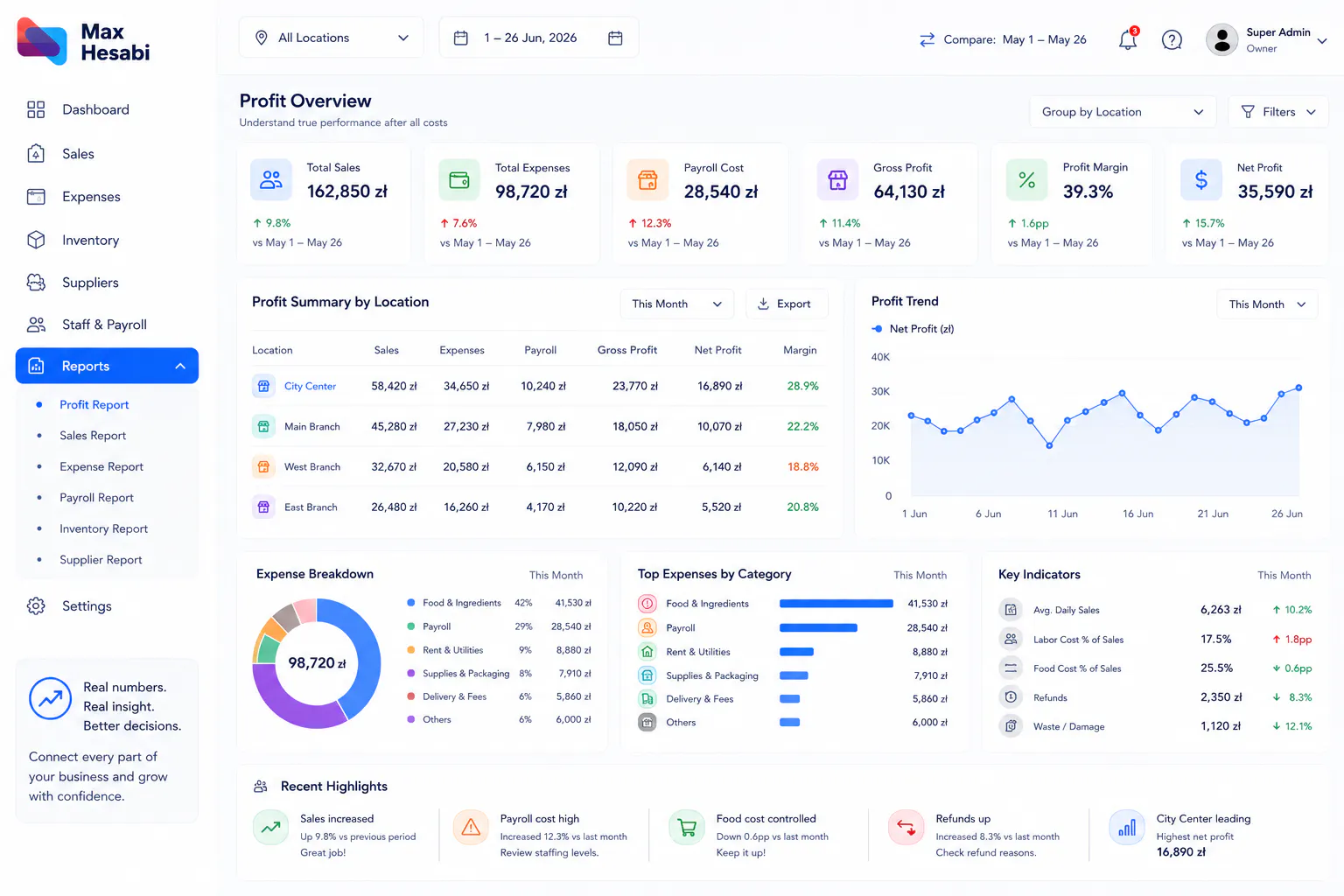
How to Use Restaurant Profit Reports in Max Hesabi
Learn how to read profit reports, compare sales with expenses, review payroll and supplier costs, understand location performance, and make better restaurant decisions in Max Hesabi.
Turn Daily Numbers into Real Business Insight
Profit reports help restaurant owners understand what is really happening behind sales. A location may look busy, but profit can still be weak if expenses, payroll, supplier purchases, waste, or refunds are too high.
Max Hesabi brings sales, expenses, payroll, suppliers, inventory activity, and location records together so owners can review restaurant performance with more confidence.
Step 1: Start with Sales, But Do Not Stop There
Sales are usually the first number owners check, but sales alone do not show business health. Profit reports become useful when sales are compared with the costs needed to create those sales.
When reviewing sales in a profit report, look at:
- Daily sales totals
- Payment breakdowns
- Refunds and adjustments
- Sales trends by week or month
- Location-by-location sales performance
- POS imported sales where connected
The goal is to understand whether sales are growing in a way that also improves profit.
Step 2: Review Expenses by Category
Expense categories show where money is going. Instead of looking at one large cost total, review categories so you can see which parts of the business are putting pressure on profit.
Common categories to review include:
- Food and ingredients
- Meat purchases
- Packaging and supplies
- Rent and utilities
- Staff and payroll costs
- Repairs, delivery fees, and operating expenses
Clear categories make it easier to spot rising costs before they become bigger problems.
Step 3: Check Payroll and Staff Costs
Payroll is one of the largest costs in most restaurants and food businesses. A branch may have strong sales, but if staffing costs are too high, profit can still suffer.
Use profit reports to compare payroll with sales and location performance. Ask questions such as:
- Did staff costs rise faster than sales?
- Is one branch spending more on labor than others?
- Were staffing levels higher because of a special event or busy period?
- Do manager notes explain unusual payroll changes?
- Is labor cost affecting monthly profit?
Step 4: Include Supplier and Purchase Costs
Supplier purchases directly affect profit, especially for meat, ingredients, drinks, packaging, and daily supplies. Max Hesabi helps connect supplier activity with purchases, expenses, and inventory records.
When reviewing supplier costs, look for patterns:
- Which suppliers were used most often?
- Did purchase costs increase compared with previous months?
- Do purchases match stock usage and sales activity?
- Are any supplier balances overdue or unclear?
- Did one location buy more than expected?
Step 5: Compare Inventory Activity with Profit
Inventory tells an important part of the profit story. If stock usage, waste, damage, or transfers are not reviewed, owners may miss why profit changed.
Review inventory activity alongside profit reports to understand:
- Meat and ingredient usage
- Damaged or wasted stock
- Purchases that increased stock costs
- Transfers between locations
- Low-stock issues that affected service
- Whether usage matches sales performance
Step 6: Compare Locations Fairly
For multi-location operators, profit reports should be reviewed by branch. This helps owners see which locations are truly performing well and which ones need attention.
When comparing locations, do not only compare total sales. Review sales, expenses, payroll, supplier purchases, inventory activity, manager notes, and profit together.
A smaller branch can be more profitable than a larger one if costs are better controlled.
Step 7: Review Month-by-Month Trends
One report gives a snapshot, but trends show whether the business is improving. Review profit reports across weeks and months to understand how decisions, seasons, supplier prices, payroll changes, and customer demand affect the business.
Useful trend questions include:
- Is profit improving or shrinking?
- Are expenses growing faster than sales?
- Which month had unusual supplier or payroll costs?
- Which branch improved most compared with last month?
- Are refunds, waste, or adjustments increasing?
- Do reports match what managers are seeing on site?
Step 8: Use Reports to Decide What to Fix First
Profit reports are not only for looking back. They should help owners decide what to improve next. If payroll is high, review staffing routines. If purchases are rising, review suppliers and inventory. If sales are strong but profit is weak, check expenses and waste.
Use Max Hesabi reports to turn business questions into action instead of guessing from incomplete numbers.
Common Mistakes to Avoid
- Judging performance by sales only
- Ignoring payroll when reviewing profit
- Combining all locations into one unclear report
- Not checking supplier and inventory activity
- Reviewing reports without manager context
- Waiting too long to act on rising costs
Recommended Profit Report Checklist
Sales are reviewed
Daily sales, payment breakdowns, refunds, and location performance are checked first.
Expenses are categorized
Costs are grouped clearly so owners can see where money is going.
Payroll is included
Staff costs are reviewed alongside sales and location performance.
Supplier costs are checked
Purchases and supplier balances are included in the profit picture.
Inventory activity is considered
Usage, damage, waste, and transfers are reviewed with profit reports.
Locations are compared
Each restaurant, kebab shop, cafe, or branch is reviewed fairly.
Trends are monitored
Reports are compared over time so owners can act early.
What to Do Next
After learning how to use profit reports, review your setup regularly. Strong reports depend on consistent sales tracking, clear expense categories, accurate supplier purchases, reliable inventory activity, and complete staff cost records.
When those parts are connected, Max Hesabi gives owners a clearer view of performance and better control over restaurant growth.